Meet Rocketlane’s Annotations & Proofing for creative projects


•
•
Summarize blog with






The creative process is a complex and rich experience. Being in the creative business (marketing agencies, design agencies, and the like) can be rewarding.
However, working at record speed to consistently produce stellar creative assets for clients is strenuous. Additionally, coordinating with internal stakeholders and clients for feedback and approvals is time-consuming and occupies your team’s mind-share unnecessarily.
Churning out high-quality creatives with a quick turnaround time is almost impossible with all these impediments.
Today, collaboration with clients on assets happens via various disconnected channels - emails, Slack messages, phone conversations, and face-to-face meetings. A clear recipe for miscommunication. Inevitably, this leads to the endless sifting of emails in inboxes, DMs, and threads. All exchanges and comments (almost always lost in inboxes and messenger apps) can overwhelm stakeholders on both sides.
But it doesn’t have to be that way.
Meet Rocketlane’s Annotations & Proofing feature: it will speed up your review and approval workflow, keep track of file versions, and improve client collaboration making managing creative projects a total breeze!
Use Rocketlane to eliminate the chaos of digging through inboxes and Slack channels for the latest feedback and versions of assets. Clients can collaborate, review and approve creatives from the built-in client portal. Skip the messy process, help your creative team focus on work that matters.
Here’s how.
Provide feedback that’s accurate, actionable, quick
Attach image or PDF files to tasks on Rocketlane and streamline change requests for your creative or copy exactly where they’re needed–your clients and reviewers can leave comments, and you can respond to them and close feedback.
This means no more wading through email trails, Slack threads, or DMs! Communicate clearly, effortlessly, and efficiently with Rocketlane’s annotations and proofing feature.
Commenting on a creative asset with Annotations and Proofing
Uploading a new version of a creative asset with Annotations and Proofing
Compare versions of files to know exactly what’s changed
With the Annotations and Proofing feature, you can view and compare different file versions. This is especially helpful in situations while proofing documents or creatives.
Side-by-side view of two different versions of creative assets
Overlay view of two different versions of creative assets
You can also link versions to rotate and zoom them in and out of them synchronously. Dive into the nitty-gritty of the creative and seek out the smallest of details for the perfect deliverable!
Linking versions for synchronous actions
By default, the latest uploaded attachment is set as the final version. However, in case you want to revert a file to its earlier version and set that as the final approved version, you can do that too!
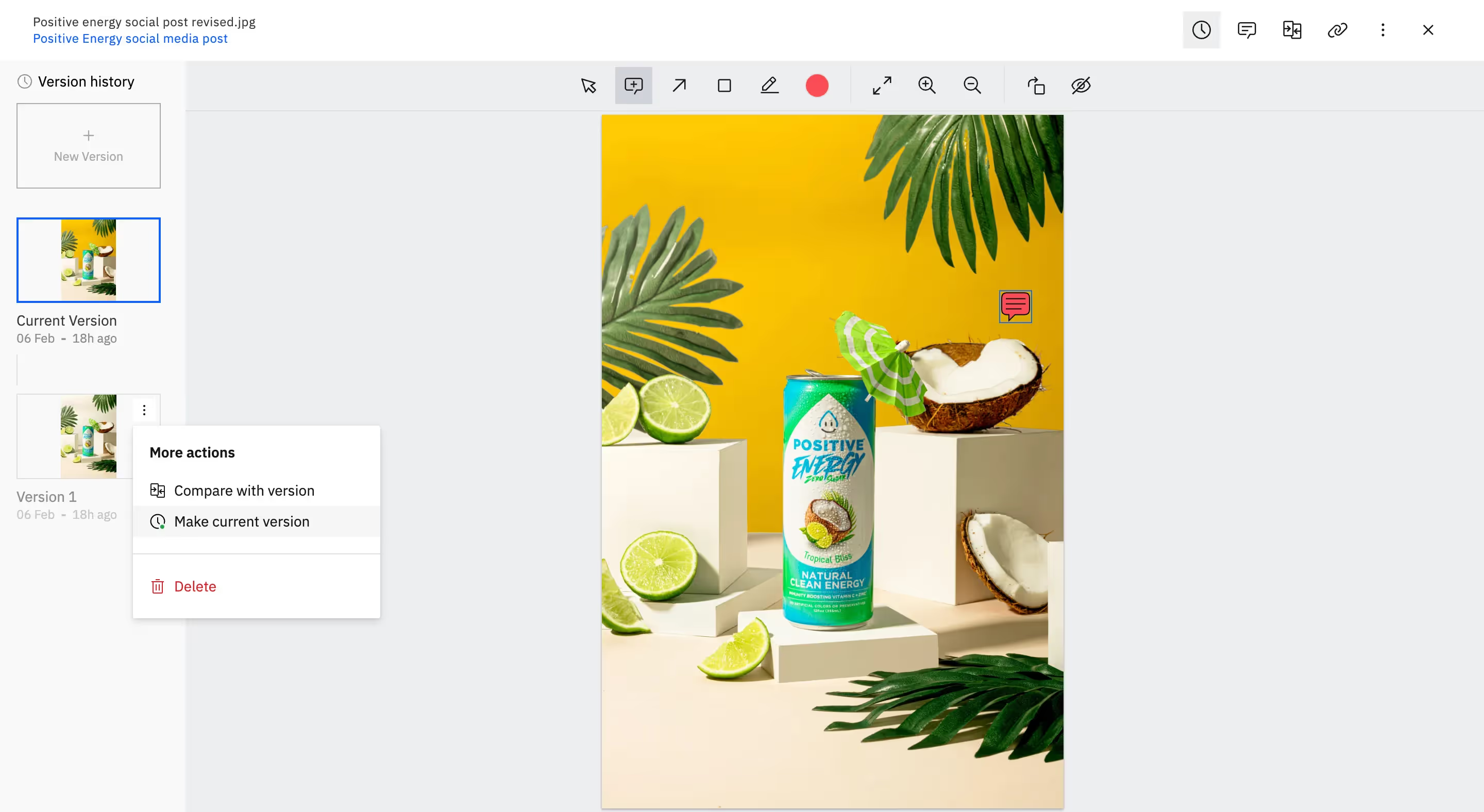
Update all stakeholders without breaking a sweat
Proofing and providing feedback for creative assets is only the first step in the process. Once the feedback is incorporated, you can tag your client in a comment on the file to let people know you’ve worked on their comments, resolve comments, have conversations, and close the loop. Your clients and reviewers will get notified when you tag them in conversations that they can address from their portal.
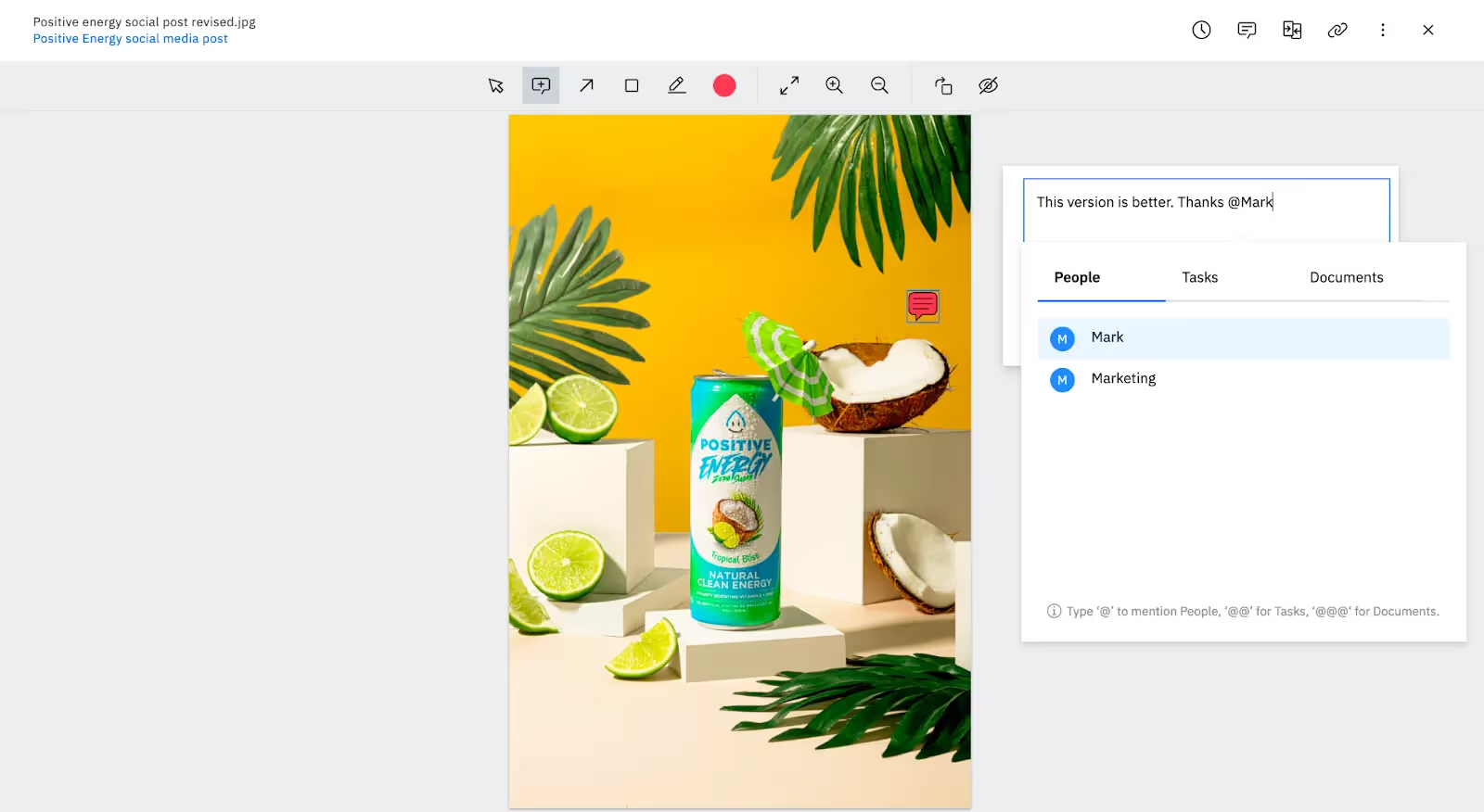
If you want to see how Rocketlane can help marketing teams level up their client projects, click here. If you want to learn more about Annotations and Proofing on Rocketlane, check out our detailed how-to guide.
What are you waiting for? Sign up for Rocketlane, and give Annotations and Proofing a spin!
More features and resources on Rocketlane to check out:
- Measure performance across projects with Operations Insights reports
- How Rocketlane Forms can make customer onboarding smooth and friction-free
- Introducing Time Tracking for Customer Projects
- Rocketlane X Slack: Collaborate from the comfort of Slack
- Track time off for your resource planning and scheduling on Rocketlane
Table of Contents

Regsiter for the live webinar


Great consultants didn't join your team to spend Fridays writing documentation.
Table of contents
18 of Forbes Cloud 100 chose Rocketlane. The best PS teams aren't waiting around.
FAQs













Copyright © 2026 Rocketlane Corp. All rights reserved.





















.webp)